vscode 相关插件
概述
vscode + cmake 可以实现 C/C++ 项目开发和构建。可以在 vscode 上装以下几个插件:
- C/C++
- CMake
- CMake Tools
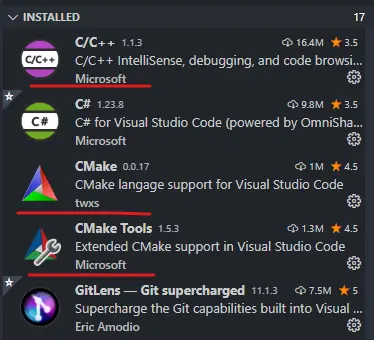
C/C++
这个插件是微软的 C/C++ 的官方 lsp 服务器,还具有调试的功能,详细文档见:https://code.visualstudio.com/docs/languages/cpp
代码提示
对于简单的项目,代码提示开箱即用,但对于复杂的项目,要实现精准的代码提示,一般需要指定 compile_commands.json。
compile_commands.json 可以手动在配置中指定
{
  "configurations": [
      {
          "name": "Linux",
          "includePath": [],
          "defines": [],
          "compilerPath": "/usr/bin/g++",
          "cStandard": "gnu11",
          "cppStandard": "gnu++14",
          "intelliSenseMode": "gcc-x64",
          "compileCommands": "~/hello/build/compile_commands.json"
      }
  ],
  "version": 4
}
也可以直接借助 CMake Tools 等配置方自动注入。详见后边的章节。
后边也会具体讲一下 compile_commands.json 的生成方式。
调试
配置
c_cpp_properties.json 存放其配置
常用的一些选项
configurationProvider:
可以为源文件提供 IntelliSense 配置信息的 VS Code 扩展的 ID。例如,使用 VS Code 扩展 ID“ms-vscode.cmake-tools”从 CMake Tools 扩展提供配置信息。
compileCommands:
工作区中 compile_commands.json 文件的完整路径。此文件中发现的包含路径和定义将替代为 includePath 和 defines 设置中设置的值。如果编译命令数据库中没有与在编辑器中打开的文件对应的翻译单元条目,则会出现警告消息,并且扩展将使用 includePath 和 defines 设置。
compile_commands.json
compile_commands.json 是编译的数据库文件(https://clang.llvm.org/docs/JSONCompilationDatabase.html),里面存放了所有编译的命令,可以用来代码提示
一般来说指定了 cmake 插件,会自动去特定的位置寻找这个文件。
生成
cmake 可以用于生成 compile_commands.json,只需要在运行 cmake 时添加参数 DCMAKE_EXPORT_COMPILE_COMMANDS=True 或者在 CMakeLists.txt 中添加 set(CMAKE_EXPORT_COMPILE_COMMANDS True)。
例子:假设在 ~ 目录下有一个 hello 的项目
cd ~/hello
mkdir build
cd build
cmake -DCMAKE_EXPORT_COMPILE_COMMANDS=True ..
会在 ~/hello/build 下生成 compile_commands.json。
详细文档见:https://cmake.org/cmake/help/latest/variable/CMAKE_EXPORT_COMPILE_COMMANDS.html
配置
生成后,在 vscode 中打开 ~/hello 目录,配置 .vscode/c_cpp_properties.json。指定 compileCommands 为上一步的 ~/hello/build/compile_commands.json:
{
  "configurations": [
      {
          "name": "Linux",
          "includePath": [],
          "defines": [],
          "compilerPath": "/usr/bin/g++",
          "cStandard": "gnu11",
          "cppStandard": "gnu++14",
          "intelliSenseMode": "gcc-x64",
          "compileCommands": "~/hello/build/compile_commands.json"
      }
  ],
  "version": 4
}
也可以通过配置 configurationProvider,让 cmake 插件自动修改这个字段。
CMake Tools
CMake Tools插件 能够给 C/C++插件 提供信息,实现 IntelliSense、代码补全、注释浏览、文件转跳等功能。
CMake Tools 可以作为 C/C++ 插件的配置提供者,这样就不用自己指定 .vscode/c_cpp_properties.json 的 includePath 和 defines。
作为 C/C++ 的 configurationProvider
具体可以通过以下两种方式去修改。
在当前工作目录的 .vscode/settings.json 文件(即当前工作目录的设置文件,会覆盖用户设置文件)中添加:
{
    "C_Cpp.default.configurationProvider": "ms-vscode.cmake-tools"
}
一般在第一次使用 CMake Tools插件 时会出现如下提示:
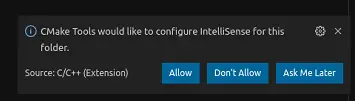
Allow 之后会自动写入这个文件
当然,也可以在 C/C++插件 的配置文件 .vscode/c_cpp_properties.json 中手动指定 configurationProvider:
{
    "configurations": [
        {
            "name": "Linux",
            "includePath": [],
            "defines": [],
            "compilerPath": "/usr/bin/gcc",
            "cStandard": "gnu11",
            "cppStandard": "gnu++14",
            "intelliSenseMode": "gcc-x64",
            "configurationProvider": "ms-vscode.cmake-tools"
        }
    ],
    "version": 4
}
配置的详细文档见:
https://code.visualstudio.com/docs/cpp/c-cpp-properties-schema-reference
https://code.visualstudio.com/docs/cpp/customize-default-settings-cpp
参考资料
https://code.visualstudio.com/docs/cpp/cmake-linux
https://code.visualstudio.com/docs/cpp/configure-intellisense-crosscompilation